Testing and Deployment
After implementing your CRUD operations, it's essential to test them locally before deploying to production. This section covers local testing and deployment procedures.
Test Your Implementation Locally
Start Development Server
terminal
# Start the local development server
npm run dev
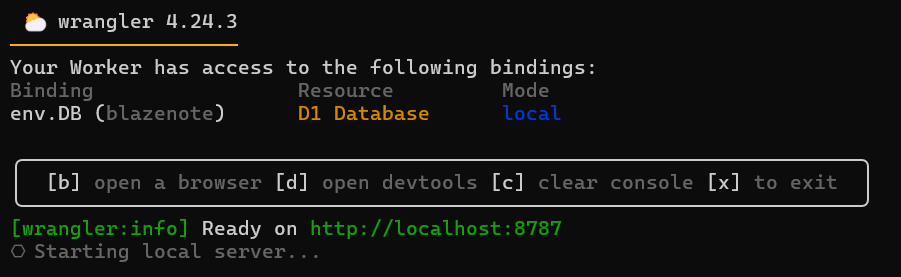
Expected output:
⛅️ wrangler 3.109.2
--------------------
▲ [WARNING] WARNING: You have Wrangler dev --local mode enabled.

Ready on http://localhost:8787
Test API Endpoints
Test GET /notes (should return empty array initially):
terminal
curl http://localhost:8787/notes
Expected response:
[]
Test POST /notes (create a note):
terminal
curl -X POST http://localhost:8787/notes \
  -H "Content-Type: application/json" \
  -d '{"id": "0001" ,"title": "My First Note", "description": "This is a test note created via API"}'
Expected response:
{ "message": "note created" }
Test GET /notes again (should now show the note):
terminal
curl http://localhost:8787/notes
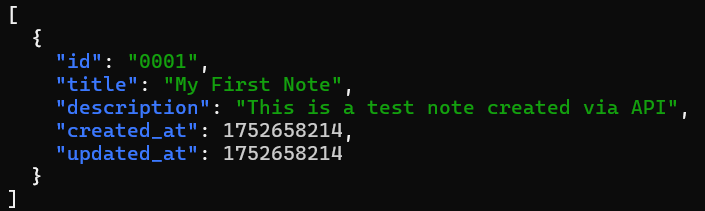
Expected response:
[
  {
    "id": "01934d2e-4567-7890-abcd-ef1234567890",
    "title": "My First Note",
    "description": "This is a test note created via API",
    "created_at": 1737891234,
    "updated_at": 1737891234
  }
]
Deploy Backend Changes
Deploy via Wrangler
Deploy your updated backend:
terminal
npm run deploy
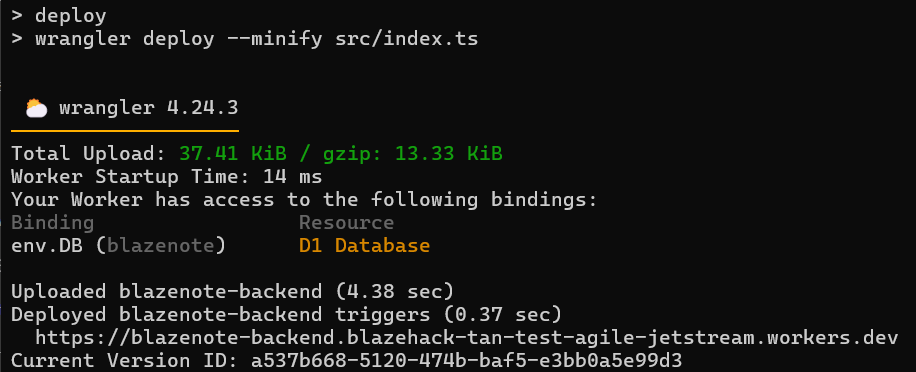
Expected output:
⛅️ wrangler 3.109.2
--------------------

Total Upload: 45.67 KiB / gzip: 12.34 KiB
Uploaded blazenote-backend (1.23s)
Published blazenote-backend (3.45s)
  https://blazenote-backend.your-subdomain.workers.dev
Current Deployment ID: abc123def456
Verify Backend Deployment
Test your production API:
terminal
# Test the production endpoint (replace with your domain)
curl https://api.yourname.com/notes
Expected response:
[]
Test creating a note:
terminal
curl -X POST https://blazenote-backend.<slug>.sxplab.com/notes \
  -H "Content-Type: application/json" \
  -d '{"id": "0001", "title": "Production Test", "description": "Testing production API"}'
Expected response:
{ "message": "note created" }

📝 Note down your domain:
Your domain is in the form
<SLUG>.sxplab.com. You can also find your domain/zone name in the Cloudflare dashboard.